 Posted by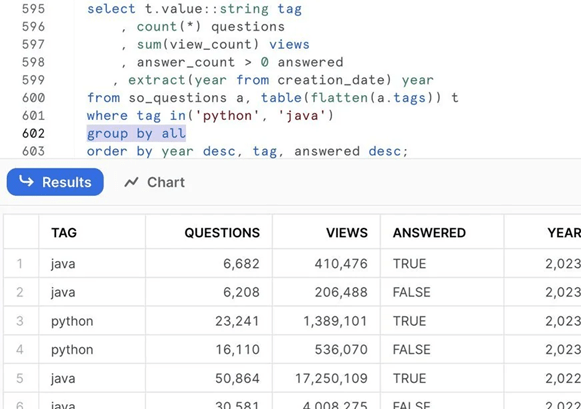
When my daughter was 18 months old, we found ourselves in the timeless parental negotiation that happens in driveways across America. She wanted to bring her entire Paw Patrol collection to swimming lessons. We, being reasonable adults, said she could pick two.
“How about five of them?” she countered with the confidence of a seasoned negotiator.
We met her halfway. “How about three?”
Then she looked up at us with those big eyes and delivered what can only be described as a mic drop moment for toddlers everywhere: “How about ALL of them?”
My wife and I nearly died laughing. Our 18-month-old had just discovered the power of “all” – and honestly, she wasn’t wrong. Why pick and choose when you can have everything?
This memory came flooding back when I first encountered Snowflake’s GROUP BY ALL function. It’s the same energy, the same elegant solution to an age-old problem. Why manually list every dimension when you can just say “all of them”?
The Old Way: Manual Dimension Management
If you’ve written SQL for more than five minutes, you know the pain. You craft a beautiful query with three dimensions in your SELECT clause. You carefully type them into your GROUP BY. The query runs. Life is good.
Then someone asks, “Hey, can we also break this out by region?”
You add region to your SELECT. You run the query. ERROR. Oh right, you forgot to add it to the GROUP BY clause. You scroll down, add it, run it again. Now it works.
Let’s see this in action with the TPCDS sample data everyone with Snowflake has access to:
-- The Traditional Manual MethodSELECT ss_store_sk, ss_item_sk, d_year, d_qoy, SUM(ss_sales_price) AS total_sales, COUNT(*) AS transaction_countFROM snowflake_sample_data.tpcds_sf10tcl.store_sales ssJOIN snowflake_sample_data.tpcds_sf10tcl.date_dim d ON ss.ss_sold_date_sk = d.d_date_skWHERE d_year = 2002GROUP BY ss_store_sk, ss_item_sk, d_year, d_qoyORDER BY total_sales DESCLIMIT 10;
This works perfectly. Until it doesn’t. Add a dimension to your SELECT, forget to update the GROUP BY, and you’re greeted with an error message. It’s the data equivalent of leaving the house without your keys – annoying, predictable, and entirely preventable.
The Slightly Better Way: Positional GROUP BY
Some clever folks discovered you could use column positions instead of names. It’s like SQL’s version of “you know what I mean”:
-- The Positional MethodSELECT ss_store_sk, ss_item_sk, d_year, d_qoy, SUM(ss_sales_price) AS total_sales, COUNT(*) AS transaction_countFROM snowflake_sample_data.tpcds_sf10tcl.store_sales ssJOIN snowflake_sample_data.tpcds_sf10tcl.date_dim d ON ss.ss_sold_date_sk = d.d_date_skWHERE d_year = 2002GROUP BY 1, 2, 3, 4ORDER BY total_sales DESCLIMIT 10;
At first glance, this seems genius. Add a dimension? Just add another number! But here’s where it gets messy. What happens when you rearrange your SELECT columns? Or when someone unfamiliar with your query needs to understand what’s being grouped? They’re stuck counting on their fingers like a first-grader doing math.
“Okay, 1 is store, 2 is item, 3 is… wait, did I move that?”
It’s functional, but it’s also the SQL equivalent of that junk drawer in your kitchen – it works until you need to find something specific.
The Snowflake Way: GROUP BY ALL
Then Snowflake shipped GROUP BY ALL, and it was like my daughter’s toddler wisdom had been crystallized into SQL syntax. Why pick and choose? Why count positions? Just group by ALL of them.
-- The GROUP BY ALL MethodSELECT ss_store_sk, ss_item_sk, d_year, d_qoy, SUM(ss_sales_price) AS total_sales, COUNT(*) AS transaction_countFROM snowflake_sample_data.tpcds_sf10tcl.store_sales ssJOIN snowflake_sample_data.tpcds_sf10tcl.date_dim d ON ss.ss_sold_date_sk = d.d_date_skWHERE d_year = 2002GROUP BY ALLORDER BY total_sales DESCLIMIT 10;
That’s it. That’s the whole thing. Snowflake looks at your SELECT clause, identifies everything that isn’t an aggregate function, and groups by those columns automatically.
Want to add region to your analysis? Add it to the SELECT. That’s it. No GROUP BY update needed. Want to remove quarter? Take it out of the SELECT. GROUP BY ALL already knows.
Why This Matters More Than You Think
In my day-to-day work with some of the largest Salesforce & Snowflake customers globally, I see data teams spending countless hours on what I call “maintenance SQL” – queries that work perfectly fine but need constant tweaking as requirements evolve. Adding a dimension here, removing one there, constantly keeping the SELECT and GROUP BY clauses in sync.
GROUP BY ALL eliminates an entire category of SQL errors. It’s the difference between having to manually sync two lists versus having one source of truth. It makes code reviews faster because reviewers don’t need to mentally verify that every dimension appears in both places. It makes refactoring safer because you can’t accidentally create a mismatch.
Is it the most complex feature Snowflake has shipped in the last three years? No. Is it one of my favorites? Absolutely. The best features aren’t always the flashiest – sometimes they’re the ones that remove friction so effectively that you forget the friction ever existed.
The Toddler Taught Me Well
My daughter is older now, and her negotiation tactics have evolved beyond Paw Patrol toys. But that moment in the driveway stuck with me because she was right. Sometimes the best solution isn’t a compromise between competing options – it’s recognizing that you can have all of them without the complexity.
That’s exactly what GROUP BY ALL does. It takes what used to be a careful balancing act – tracking dimensions across multiple parts of your query – and replaces it with a simple, elegant solution that just works.
Next time you’re writing a GROUP BY clause, ask yourself: “Why am I listing these dimensions individually?” If the answer is “because that’s how we’ve always done it,” maybe it’s time to channel your inner toddler and just say: “How about ALL of them?”
Happy querying!
 Big Data Dave